

SmartMockups.com vs. Mockupanda: Which Tool Actually Saves More Time When You're Scaling a Print-on-Demand Catalog?
If you found this page by searching for smartmockups com, you're probably already past the beginner stage. You've tried making mockups one at a time, you know how long it takes, and now you're looking for a tool that can keep up with a growing catalog. That's exactly the right question to be asking, and it's the question this post answers directly.
Both SmartMockups and Mockupanda sit in the same general category: tools that help sellers create product listing images without hiring a photographer or opening Photoshop for every single design. But once you look past the surface, the two tools make very different assumptions about how you work, how fast your catalog grows, and whether you'll ever want to automate any of this.
Let's get into the specifics.
What Each Tool Is Actually Built For
SmartMockups: A Template Browser With Individual Generation
SmartMockups is a well-known name in the mockup space, and for good reason. It has a large template library, a clean interface, and it gets the job done when you need one or two mockups quickly. The workflow is straightforward: pick a template, upload your design, export the image.
The problem is that workflow doesn't scale. When you're launching ten new designs a week, or trying to apply a single design across thirty different templates to fill out a product listing, doing it one at a time stops being a workflow and starts being a job. The tool is built around individual generation, which is fine for occasional use but becomes a real bottleneck once your catalog grows.
Mockupanda: Built Around Bulk From the Start
Mockupanda frames the core problem differently. The pitch isn't "here's a nice mockup tool." It's "here's how you stop spending hours making mockups one at a time." That framing shapes every part of the product.
The bulk mockup generator lets you upload a design once and apply it across dozens of templates in a single run. You get all of them downloaded as a ZIP file, full of high-resolution JPEGs that are ready for Etsy, Shopify, or any print-on-demand platform. The whole process, from upload to ZIP download, is designed to take under a minute.
For sellers creating twenty or more listings per week, that difference compounds fast. Batching mockup generation instead of processing each template manually is where the real time savings live, and Mockupanda is built specifically around that workflow.
Takeaway: If you're making mockups one at a time, either tool works. If you're scaling a catalog, the tool built around bulk generation from the start is going to serve you better.
Bulk Generation: The Specific Mechanics
How Mockupanda's Bulk Workflow Works
The bulk flow in Mockupanda is three steps. You drag and drop your artwork, which is instantly applied to templates. You browse and select the templates you want, or generate across all available ones at once with a single click. Then you download a ZIP containing all your mockups as high-resolution JPEGs.
The artwork formats accepted are JPEG, PNG, GIF, and WebP. If you upload a transparent PNG, the alpha channel is preserved. Downloads come out as roughly 90% quality JPEGs, and through the API you can request output up to 4000 pixels wide if you need larger files.
You're not limited to the built-in template library either. If you already own premium PSD mockup packs from sources like Creative Market or Envato, you can upload those as custom templates, as long as the PSD has a Smart Object layer named Design as the active layer. Files up to 300 MB are supported. That means your existing investment in mockup assets doesn't go to waste.
Pixel Accuracy and No AI Distortion
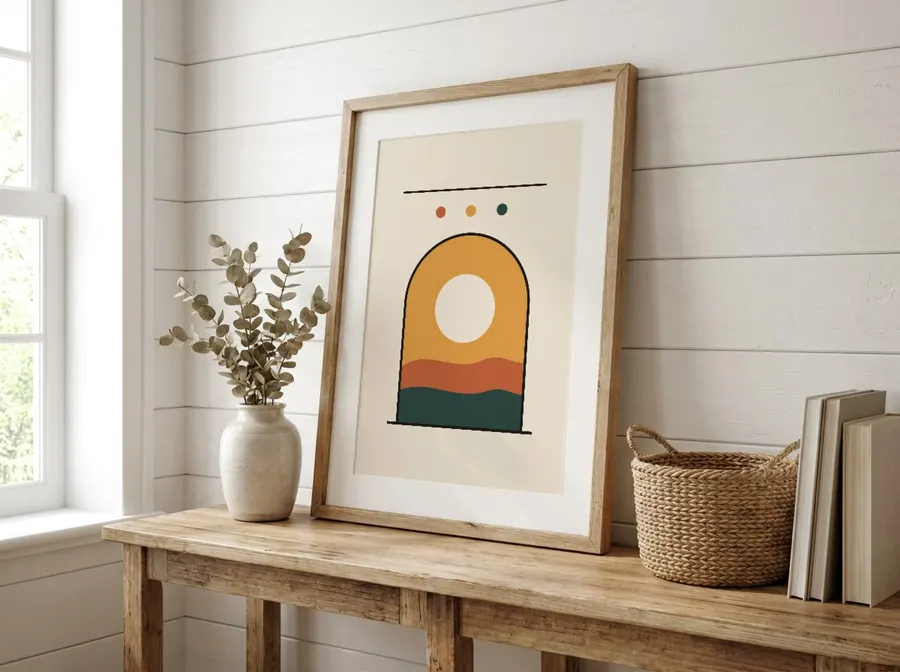
One thing worth calling out explicitly: Mockupanda renders artwork with no AI distortion or blurring. The images it produces are pixel-perfect composites. Your design goes into the mockup exactly as you created it, with no blurring and no skewed proportions.
This matters more than it might sound. When you're producing listing images at scale, any inconsistency in quality becomes visible across your shop. A buyer browsing through your listings will notice if some mockups look crisp and others look slightly blurred. Consistent, pixel-accurate rendering across every template in a batch is a real quality advantage at volume.
Takeaway: Mockupanda's bulk generation is genuinely fast, the output quality is consistent across every template in a batch, and custom PSD support means you can bring your own templates into the same workflow.
Pricing: What You Actually Pay at Scale
SmartMockups Pricing Structure
SmartMockups operates on a subscription model with different tiers that gate access to template libraries and download limits. The exact pricing changes over time, so always check their current site, but the general structure is a monthly or annual plan where you pay for access to the platform.
The concern with this model at scale is when the per-download economics start to feel tight. If you're generating hundreds of mockups a month and hitting limits, or if you're paying for a higher tier just to unlock templates you need, the cost adds up without a clear relationship to actual usage.
Mockupanda Pricing: Free Tier Through Lifetime
Mockupanda has four plans. The Free plan is $0 and gives you unlimited watermarked mockups, five AI credits per month, and access to all templates. The Starter plan is $48 billed yearly, which works out to $4 per month on an annual basis, and includes 700 watermark-free downloads per month and 40 AI credits. The Pro plan is $84 billed yearly and gives you unlimited downloads, 100 AI credits per month, and priority support. The Lifetime plan is $129 paid once, with 300 AI credits total, and is described as only available for a limited time.
For most active sellers, the Starter plan covers a solid weekly output. Seven hundred downloads a month is roughly 175 mockups a week, which is enough to support launching several new designs across a full range of templates every week. If you're consistently exceeding that, Pro's unlimited downloads removes the ceiling entirely.
The free tier is also genuinely useful for getting started. You can test the full template library with watermarked mockups before paying anything, which means you know exactly what you're getting before you commit.
Takeaway: Mockupanda's pricing is transparent, the free tier gives you real access to evaluate the tool, and the annual plans offer a meaningful discount over monthly pricing.
API Access: For Sellers Who Want to Automate
SmartMockups and Automation
SmartMockups does not offer a public API as a core product feature in the same way that a developer-focused tool would. If your goal is to embed mockup generation into your own app, trigger renders programmatically when a new design is uploaded, or build a custom workflow that automates listing creation end to end, SmartMockups is not built for that use case.
Mockupanda's REST API
Mockupanda has a full REST API at https://www.mockupanda.com/api/v1. The primary endpoint for generation is POST /mockups/generate, and it supports a batch mode where you pass a template_ids array with up to 12 templates per request. One artwork URL in, up to 12 rendered mockups back, in a single API call.
Here's what a batch request looks like in practice:
curl -X POST https://www.mockupanda.com/api/v1/mockups/generate \
  --http1.1 \
  -H "Authorization: Bearer YOUR_API_KEY" \
  -H "Content-Type: application/json" \
  -d '{
    "template_ids": ["bedroom-poster-01", "frame-wall-02", "living-room-03"],
    "artwork_url": "https://example.com/art.jpg",
    "response_format": "json"
  }'
The response comes back with a base64-encoded JPEG for each template, along with the template ID and file size. Failed requests cost zero credits, so you're not charged for errors.
There's also a concept called Sets, which is particularly useful for automation at scale. A Set is a named, ordered group of templates that you create and manage in the app. Once you've defined a Set, you can render the entire group with a single set_id in your API call, instead of repeating the same list of template IDs in every request. Sets can mix built-in templates with your own custom ones, and they belong to the account that owns the API key.
This is the difference between building a pipeline that works once and building one that adapts as your template preferences evolve. Update the Set in the app, and every future API call automatically uses the updated group.
The API uses a credit-based pricing model: 1 credit equals $0.01, so one cent per mockup. Credits never expire, there are no volume discounts, and there are no monthly limits. If you need 10,000 mockups in a month and then almost none the next month, you only pay for what you actually use. Top-ups start at a minimum of $1 and go up to $1,000 per transaction, processed through Stripe.
Rate limits are 100 requests per minute and 10,000 requests per day per API key, which is enough headroom for any serious catalog operation.

Code samples in the documentation are provided in cURL, JavaScript, Python, Node.js, and PHP, so regardless of your stack you can get started without translating examples.
Takeaway: If you ever want to automate any part of your mockup workflow, Mockupanda's API gives you a real path to do that. The batch mode, the Sets feature, and the pay-per-use pricing model are all designed for programmatic use at scale.
Template Quality and the Real-Time Editor
Adjusting Artwork Before a Bulk Run
One thing that separates a good bulk tool from a frustrating one is whether you can make adjustments before committing to a full batch. If the artwork placement looks slightly wrong on one template, you want to catch that before downloading forty mockups that all have the same positioning issue.
Mockupanda's editor lets you move and resize your artwork in real time before running a bulk generation. You can see exactly how your design sits in a template, reposition it, and scale it. The real-time editor for repositioning and resizing artwork is part of the same workflow as the bulk generator, not a separate tool you have to switch to.
There's also a text tool for adding text overlays directly to mockups. You can set fonts, size, color, alignment, and position, and the text is baked into the final downloaded image. If you add a title, a price, or a promotional line to your listing images, you don't need to take the mockup into a separate design tool afterward.
Template Search and Filtering
When you're working with a large template library, finding the right templates quickly matters. Mockupanda's API offers hybrid semantic search, so you can search by description in natural language, and you can filter by aspect ratio or by artwork matching. For sellers who know they need a specific style of wall art template or a particular product category, this makes narrowing down the library much faster than scrolling through everything manually.
The GET /templates endpoint exposes this search and filtering, including the q parameter for semantic search and aspect-ratio filters, so if you're building an automated pipeline you can query the template library programmatically.
Takeaway: The real-time editor, the text tool, and the semantic template search all reduce the friction between uploading a design and getting a finished batch of listing images. These are the small things that add up to significant time savings across hundreds of listings.
Which Tool Should You Choose
When SmartMockups Makes Sense
SmartMockups is a reasonable choice if you're making mockups occasionally, you need a specific type of template that happens to be in their library, or you're not yet at the volume where bulk generation makes a meaningful difference. It's a mature product with a good reputation for individual use cases.
When Mockupanda Is the Better Fit
Mockupanda is the better fit when you're operating at scale or planning to get there. The bulk generator, the custom PSD support, the real-time editor, and the REST API all point toward the same use case: a seller or designer who needs to produce a high volume of consistent, high-quality listing images without turning mockup creation into a full-time job.
The free tier removes all the risk from trying it. You get access to all templates and unlimited watermarked mockups on day one. If you want to compare how Mockupanda stacks up against other popular mockup tools beyond just SmartMockups, that comparison is worth reading before making a final decision.
For developers at print-on-demand businesses who want to embed mockup rendering directly into an app or listing workflow, the API is the real differentiator. Mockupanda gives you pay-per-use credits, a batch mode, named template Sets, and documentation with multi-language code samples, all in one place.
Takeaway: Start with the free tier, run a batch of mockups with your actual designs, and see how long it takes. That single test will tell you more than any comparison post can.
Keep reading

How to Upload a Custom PSD Smart Object Template and Expose It as an API-Renderable Resource in Your POD Workflow

How to Manage Multiple Mockupanda API Keys Across Dev, Staging, and Production Environments Without Leaking Credentials
