Ad Mocker Alternatives for Print-on-Demand Sellers: Bulk Mockups, PSD Import, and a REST API Compared
If you landed here searching for ad mocker alternatives, you are probably stuck on the same problem most print-on-demand sellers hit: you have finished artwork, you know what listings you want to create, but producing a consistent set of listing photos for every design across every product takes longer than the design work itself. That bottleneck is real, and picking the right mockup tool is how you break it.
This post compares what actually matters when you are evaluating alternatives: how bulk generation works, whether you can import your own PSD files, and what an API costs if you want to automate the whole thing. We will also look at Mockupanda specifically, because it covers all three of those areas in one browser-based tool.
What to Look for in an Ad Mocker Alternative
The bottleneck is almost never the mockup itself
The slow part is not rendering one mockup. It is multiplying designs by templates. If you have 10 designs and want 8 listing photos each, you are looking at 80 individual renders. Do that one at a time in any tool and you will spend more time on mockups than on sourcing new art.
A real alternative to any mockup tool needs to let you upload a design once and produce every combination you want in a single step. That is what separates a bulk generator from a mockup editor. An editor is fine for checking how one design looks. A bulk generator is what you need when you are trying to get a full catalog listed this week.
Not all rendering is equal
Some tools place your design as a flat overlay on top of a photo. Others actually draw it into the scene, applying the perspective of the frame or surface, the shadows and highlights of the room lighting, and the texture of the fabric or paper. The difference is visible in the final image. A flat overlay looks pasted. A properly rendered mockup looks photographed.
When you are comparing options, check whether the tool uses perspective mapping and scene lighting, or whether it is just resizing and positioning a layer on top of a background image.
API pricing models vary more than you might expect
If you are a developer or you want to integrate mockup generation into your own tools, the pricing differences between products are significant. Some charge per seat with a monthly subscription. Some charge per render but bundle it into a subscription tier. A few offer a true pay-as-you-go wallet. The right model depends on your volume and how predictable your usage is.
Actionable takeaway: Before you sign up for anything, map out your actual monthly render volume and divide the total cost by that number. The per-mockup cost is the number that matters, not the headline plan price.
Bulk Mockup Generation: How It Should Work
Upload once, render everything
Mockupanda's bulk mockup generator lets you pick multiple designs and multiple templates, and every combination renders at once from your exact files. The result downloads as a single ZIP, ready for Etsy or Shopify. If you have 3 designs and 6 templates, you get 18 listing photos in one step instead of 18 separate exports.
That is the core of what bulk generation should do. You should not have to open each template, swap the design, adjust the position, export, rename the file, and repeat. The whole point is to remove that loop.
Shopify push and ZIP download
Beyond downloading a ZIP, Mockupanda also lets you push mockups straight to Shopify if that is where your store lives. For Etsy sellers, the ZIP download is the practical path: you download the whole batch, then upload the photos to your listings as you create them.
The output is full resolution, in JPEG format at around 90% quality, and cleared for commercial use with no attribution required. That matters because some free mockup tools add watermarks or restrict commercial use on their lower tiers.
What the free plan actually gives you
If you want to test bulk generation before committing, the free plan includes every template and unlimited mockup rendering. The limit is on downloads: your first 20 come without a watermark. After that, downloads are watermarked unless you are on a paid plan. Unlimited watermarked mockups are still useful for previewing your catalog before you decide what to list.
Starter is $48 billed yearly and gives you 700 watermark-free downloads per month. Pro at $84 billed yearly gives you unlimited downloads, layered PSD downloads, and priority support. There is also a Lifetime plan at a one-time payment of $129 if you prefer not to have a recurring subscription.
Actionable takeaway: Run your first bulk job on the free plan to verify that the output quality and template selection fit your niche before you upgrade.
PSD Import: Bringing Your Own Mockup Files
Why PSD import matters
A lot of print-on-demand sellers and designers already own a library of PSD mockup files, either purchased or downloaded. The smart object in those files is what makes them work in Photoshop: you drop your design into the smart object, save, and the design appears in the scene with the correct perspective, warping, and foreground objects.
If a mockup tool supports PSD import, you can use those existing files without Photoshop. You import the PSD once, it becomes a template in the editor, and from then on you can run any design through it in bulk.
What Mockupanda's PSD import reads
The PSD mockup generator reads PSD and PSB files up to 300 MB. The import picks up several things that determine how realistic the output looks.
Perspective is read from the smart object's four corners, so your design sits at the angle the original photo was taken from rather than appearing flat. Warps, including custom warps like the kind used for mug wraps or curved shirt mockups, are read from the file's own control points. Photoshop's built-in warp styles such as Arc, Flag, and Bulge are measured and preserved too. If the tool cannot measure a warp, the design goes on flat and the editor tells you so.
Foreground objects stay in place. Layers that sit above the design layer, clipping masks, layer masks, and opacity settings all become part of the template's mask. So if the original PSD had a hand holding the product or a plant in front of the frame, those elements stay in front of your design exactly as they did in Photoshop.
Importing is free and private
PSD import is included on every plan, including the free one, with no limit on how many files you import. The file is read in your browser. What your account keeps is the processed template: the photo without the sample design, and the data that describes where and how the design appears. The original PSD is not stored on the server.
Imported templates are private to your account. Once imported, you can add text, stickers, or your logo to the template, save that setup, and every design you run through it gets the same branding treatment.
Actionable takeaway: If you have PSD mockups you already use in Photoshop, import one test file on the free plan. Check that the perspective and warp transferred correctly before you import your full library.
The REST API: Automating Mockup Generation
Who actually needs the API
Most sellers doing a few hundred listings a month will get everything they need from the bulk generator in the web app. The API is for a different situation: you want mockup rendering to happen automatically as part of a larger workflow, or you are a developer building tools for other sellers and you want to embed mockup generation in your own app.
Examples include automatically generating mockups when a new design is uploaded to your store, building a custom dashboard that renders listing photos on demand, or running a service that produces mockups for clients at scale.
How the Mockupanda API works
The endpoint is POST /api/v1/mockups/generate. You send an artwork URL and a list of template IDs, and you get the finished mockups back in the same response. One request can include up to 12 templates. Output resolution goes up to 4000 pixels wide, with a default of 2000 pixels. The output is never watermarked.
Pricing is a flat $0.01 per mockup from a prepaid wallet. You top up from $5 minimum, and credits never expire. There is no subscription and no monthly fee for API access. A batch request with multiple template IDs is charged one credit per template, and the full amount is checked against your balance before generation starts.
If a request fails, you are not charged. That matters when you are running high volumes and occasional errors are inevitable.
API pricing vs. the competition
The pay-as-you-go model is worth comparing against alternatives directly. Dynamic Mockups charges approximately $0.051 per render on top-ups, with a Pro plan starting at $15 a month billed annually. At that rate, 10,000 mockups cost roughly $510. At $0.01 per mockup, the same 10,000 through Mockupanda cost $100. Those numbers are from the Mockupanda comparison page and reflect Dynamic Mockups pricing as of October 2026.
Other tools that come up when sellers look for ad mocker alternatives, including Placeit, Mockey, Pixelied, and Smartmockups, do not currently offer a public mockup API. Smartmockups closed as a standalone product in 2024 and is now inside Canva. Kittl has no mockup API, only an MCP connector for AI chat tools. Bannerbear offers an API starting at $49 a month for 1,000 renders. Mediamodifier's API pricing starts at $499 a month for up to 5,000 renders.
If you are evaluating these options against volume you can predict, the per-mockup math is the clearest comparison.
Your own templates work in the API too
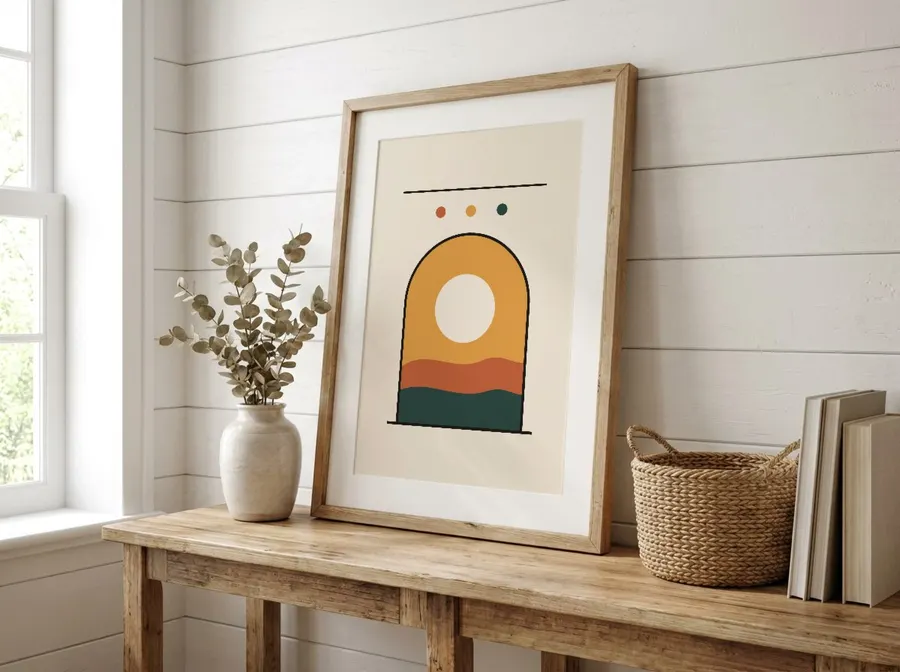
Templates you build or import in the Mockupanda editor can be used in API calls the same way as any built-in scene. You create the template in the editor, copy its ID, and reference that ID in your API request. This means custom PSD templates you have already imported are available programmatically.
One thing to note: uploading PSD files directly through the API is not supported. PSD import happens in the web editor, and then the resulting template becomes available to the API by ID.
Actionable takeaway: If you are evaluating the API, start with the free API credits included with every new account. Send one POST request with a couple of template IDs and an artwork URL to verify render quality and response time before you top up your wallet.
Comparing the Core Features Side by Side
Bulk generation, PSD import, and API in one tool
When you are searching for ad mocker alternatives, you will find that most tools specialize in one of these three areas. Some have strong bulk generation but no PSD import. Some have PSD import but charge per-seat subscriptions for the API. Finding all three in one tool at reasonable pricing is less common.
The comparison table from Mockupanda's Dynamic Mockups page captures the tradeoff well. Dynamic Mockups offers bulk mockups, PSD import, and an API, but it also integrates natively with Etsy, WooCommerce, Zapier, and Make, which is useful if you need deep store automation. Mockupanda's native integration is Shopify only, with ZIP download covering other platforms. If your workflow depends on direct Etsy automation or Zapier connections, that is a meaningful difference.
If your workflow is more manual, using the web app to generate and download, or you are a developer who wants to call a simple REST endpoint, the Mockupanda side of that comparison is straightforward.
Free tier differences
The free tier structure is worth comparing directly when you are testing tools. Mockupanda's free plan gives you access to every template and unlimited mockup rendering, with the first 20 downloads watermark-free. That is enough to run a full bulk job and evaluate the output before you spend anything.
Dynamic Mockups offers 50 starter credits on the free plan, after which you move to a paid tier. API output on the free plan is watermarked.
What stays consistent
Across paid plans on Mockupanda, the core output is the same: full resolution, commercial use cleared, no attribution. What changes with higher plans is the download volume, the number of AI credits for generating custom scenes, access to layered PSD downloads, and priority support. The rendering quality itself does not change between plans.
Actionable takeaway: Use the free plan to test with your actual artwork on the template categories that matter to your shop. Wall art, apparel, and POD products each have different rendering requirements, and you want to verify fit before upgrading.
Making the Switch: Practical Steps
Start with one product category
If you are coming from another tool, do not try to migrate your entire catalog at once. Pick one product category, whether that is wall art posters, t-shirts, or another POD product, and run a bulk job covering your existing designs in that category. Download the ZIP, compare the output to what you have been using, and adjust from there.
This also helps you identify which templates match your print ratios. Each template in Mockupanda is set to one print ratio, and the editor flags mismatches, so you will quickly see which of your designs need ratio-specific templates.
For developers: test before you integrate
If you are building an integration, start with a small batch. The API returns finished mockups in the same response as the request, with render times between 1 and 5 seconds. Send a few test requests manually using curl or a REST client, verify the output dimensions and quality match your requirements, then build the integration around those verified parameters.
The API documentation covers the /templates endpoint for discovering available template IDs, the /sets endpoint for working with named groups, and the /billing/wallet endpoint for checking your credit balance programmatically.
Scale from there
Once your first bulk job or first API integration is working, Mockupanda becomes a background process rather than a manual step. You feed in designs, you get listing photos, and the part of your workflow that used to slow everything down is no longer the constraint. That is the core promise of a bulk mockup generator, and it is what separates the tools worth switching to from the ones that just move the bottleneck somewhere else.
For sellers who want to understand the volume math in more detail before committing, the comparison against SmartMockups and other dedicated generators covers the tradeoffs in depth. And if you are thinking about what bulk generation unlocks for catalog scaling, the case for why bulk generation changes the economics of listing at scale is worth reading before you decide on a plan tier.
Keep reading

What Does PNG File Mean on Etsy? A Digital Seller's Guide to File Types, Transparency, and Why Buyers Ask
Shopify Mockup Generator: How to Push Bulk-Generated Listing Photos Directly to Your Shopify Store Without Manual Uploads