How to Price Your Etsy Digital Print Collections to Reflect the Professional Presentation Your Mockups Create

There is a pricing problem that quietly kills the revenue of thousands of Etsy digital print sellers, and most of them never notice it.
Here is what happens: a seller spends real creative energy on a design. The art is genuinely good. But the listing photo is a flat PNG on a white background, maybe dropped into a basic frame mockup that looks slightly off-center. A buyer lands on the listing, sees a $4.99 price tag, and moves on to the next shop, maybe one with beautiful lifestyle imagery of the same style of print hanging above a couch, priced at $8.99. The higher-priced listing converts better because it looks like it is worth more.
Professional presentation and pricing are not separate decisions. They feed each other. When your mockups look polished and consistent, you create the visual case for a higher price before a buyer even reads your description. And when your pricing reflects that quality, buyers trust that what they are getting is worth paying for.
This guide covers the full picture: the psychology behind value perception, how to do proper competitive research, how to structure tiered pricing across your collections, and how to make sure your mockup workflow actually supports the presentation level your prices need to justify.
Why Mockup Quality Directly Affects Perceived Price Ceiling
The Visual Value Signal Buyers Pick Up Instantly
Buyers on Etsy make snap judgments. Eye-tracking research on e-commerce listings consistently shows that the thumbnail image is processed before price, before title, and before reviews. That first image is doing the pricing work before your numbers even register.
When a digital print is shown in a well-lit, realistic room setting, hanging in a proper frame, proportioned correctly, with no weird blur or pixelation, a buyer's brain files it alongside the physical prints they have seen in boutique home goods stores. That mental comparison sets the ceiling for what feels like a fair price.
Flat, poorly lit, or distorted mockups do the opposite. They tell the buyer this is a commodity, something to be priced against every other $3 digital download on the platform.
The gap in conversion rates between high-quality and low-quality listing images is not small. Sellers who upgrade their presentation frequently report price increases of 30 to 60 percent without meaningful drops in conversion, often with conversion improving. The image does not just represent the product, it is the product, because digital prints have no physical form the buyer can inspect beforehand.
What "Professional Presentation" Actually Means in This Context
Professional presentation is not just about having a nice mockup. It is about consistency and specificity. A collection of prints that all use the same style of mockup, the same framing, the same lighting aesthetic, and the same proportions reads as a curated brand. Random mockups pulled from different sources, with different room tones and frame styles, read as assembled on the fly.
Consistency signals investment. It tells a buyer that you take your shop seriously, which implies you also take your designs seriously. That perception supports higher prices across your entire catalog, not just individual listings.
This is one of the reasons bulk mockup generation matters so much for digital print sellers. When you can apply one design across a set of templates that share a visual identity, you build collection coherence at scale. Mockupanda is built specifically for this workflow, letting you upload one design and generate consistent mockups across dozens of templates in one session, keeping your artwork pixel-perfect without any AI distortion.
Actionable takeaway: Before you revisit your prices, audit your mockup consistency. Open your shop and look at your listings as a grid. Do they look like a curated collection or a random assortment? Coherence is the first thing to fix.
How to Research Competitor Pricing Without Undervaluing Yourself
Finding the Right Comparison Set
Most Etsy sellers research competitors by searching their category and looking at the first page of results. This is misleading because Etsy's search algorithm surfaces listings based on relevance, recency, and performance, not price alone. A $2.99 listing from a high-volume shop can appear next to a $12 listing from a newer shop with better images.
Instead, narrow your research to shops that match your presentation quality. Search for your style of print (botanical, minimalist, typographic, whatever applies), then filter by listings that have professional mockup photography, multiple listing images, and a consistent shop aesthetic. These are your real competitors for the buyer's attention and wallet.
For each shop you examine, note three things: price, number of sales, and the quality of their listing images. You will usually find a clear pattern. Shops with stronger visual presentation hold higher price points and still generate substantial sales volume. Shops with weak presentation tend to cluster at the bottom of the price range, competing purely on cost.
Understanding Price Anchoring in Collections
Price anchoring is the practice of placing a higher-priced item near lower-priced ones to make the lower price feel like a deal, and vice versa. In Etsy shops selling digital prints, you can use this deliberately across your collection structure.
If your single prints are priced at $6.99 and you offer a bundle of five coordinating prints at $24.99, the bundle feels like obvious value. But the single print price also looks more reasonable because the buyer has a clear reference point for the collection's perceived worth.
The key is that your mockups need to support the bundle presentation as strongly as the individual listings. A bundle listing with five prints shown in cohesive room settings, properly framed and sized, sells the value of the collection visually. A bundle listing with one flat preview image and a note saying "includes 5 files" undersells it completely.
Actionable takeaway: Build a comparison sheet with 10 to 15 shops in your niche that have strong visual presentation. Record their price points for singles, bundles, and any tiered offerings. Use this as your actual pricing reference, not the broad category average.
Building a Tiered Pricing Structure for Your Collections
Single Prints, Bundles, and Collections as Distinct Products
One of the most effective revenue strategies for digital print sellers is treating each tier as a genuinely distinct product, not just a discount version of the same thing.
A single print at $6.99 should have its own mockup showing that specific print in a room setting. It should feel complete as a purchase.
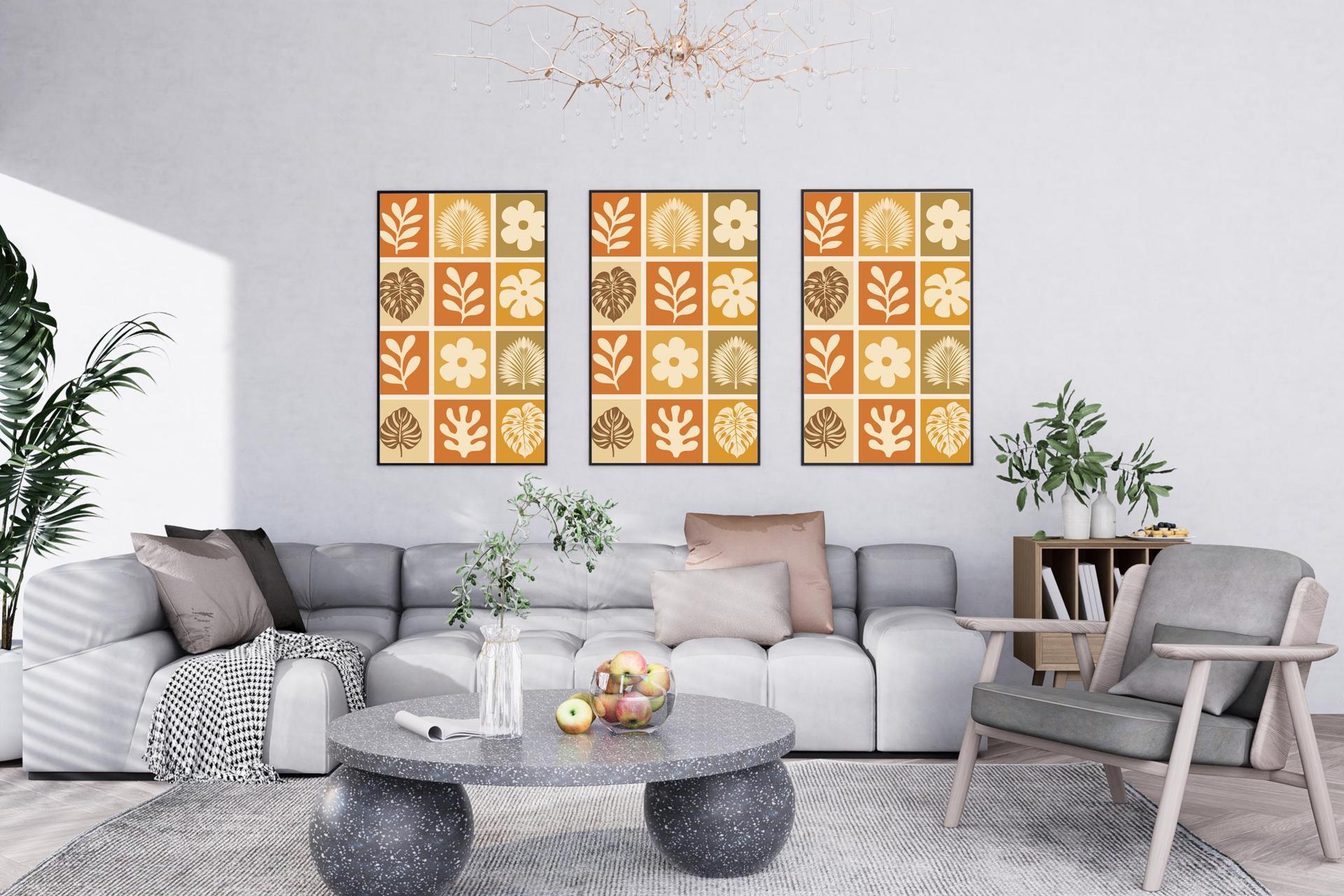
A three-print coordinating set at $14.99 should have a mockup that shows all three prints displayed together, either as a gallery wall or a triptych arrangement. This is where multi-frame mockup templates become genuinely useful. When a buyer can see three coordinating pieces hanging together in a styled space, they are not just buying files. They are buying the vision of what their wall will look like.
A full collection of eight to twelve prints at $34.99 should have gallery-style mockup imagery that conveys the depth and coherence of the set. If your mockup workflow makes it easy to generate these larger collection previews quickly, you will be far more likely to actually create and list these higher-margin products.
Pricing for Size Variations and Commercial Licenses
Digital prints often come in multiple sizes, and many sellers either underprice size bundles or ignore commercial license offerings entirely. Both are missed revenue opportunities.
For size bundles, the standard approach is to offer common print sizes (5x7, 8x10, 11x14, A4, A3) as a single download with a modest price increase over the single-size version. Buyers who want flexibility will pay $2 to $4 more to get all sizes at once rather than coming back to buy another size later. Your mockup should ideally show the design in more than one size context to reinforce that the buyer is getting a versatile product.
For commercial licenses, this is an area where Etsy digital print sellers consistently leave money on the table. If your designs are suitable for commercial use, offering a separate commercial license listing at a significantly higher price point (often 5 to 10 times the personal use price) can add meaningful revenue, especially from buyers who run small businesses, event planning companies, or interior design firms.
Professional mockup presentation matters even more for commercial license listings. These buyers are evaluating whether your work is good enough to represent their business. A polished, high-resolution mockup is part of the quality signal they need to see.
Actionable takeaway: Map out three pricing tiers for one of your existing collections: single print, coordinating set, and full collection. Create dedicated mockups for each tier using templates that match the number of pieces included. Then list all three and track which tier converts at what rate over 30 days.

How Your Mockup Workflow Affects Your Pricing Power
The Cost of Inconsistent Presentation at Scale
If you sell 50 different digital print designs and each one has a different mockup style, different frame aesthetic, and different room lighting, you are working harder than necessary and earning less than you should.
Scaling a shop means adding new designs regularly. If each new design requires rebuilding your mockup approach from scratch, the time cost alone creates pressure to cut corners. And cut corners in presentation means weaker visual value signals, which means lower price ceilings across your shop.
Builders of larger print shops often talk about setting up a standard set of templates they use for every new design, so each launch follows the same presentation formula. This is exactly the kind of workflow that Mockupanda supports through its Sets feature, which lets you save named, ordered groups of templates that you can apply to any new design in one session. You build the set once and every future upload inherits your established visual identity.
Pixel-Perfect Quality as a Non-Negotiable for Premium Pricing
Here is a practical detail that matters more than it might seem: when your artwork is rendered into a mockup template with distortion, blurring, or skewed proportions, buyers notice. They may not consciously identify the problem, but the image looks slightly off, and that subtle wrongness undermines confidence.
For premium pricing, you need mockups where your actual design is rendered cleanly at the resolution you intended. This means no AI-generated texture that softens your fine linework, no perspective warp that stretches your typography, and no color shift that misrepresents your palette.
The technical term for this is pixel-perfect rendering, and it is one of the core reasons Mockupanda was built the way it was. The tool preserves your artwork without AI distortion or blurring, which means what the buyer sees in your listing image is genuinely representative of what they will receive. That accuracy is part of what justifies premium pricing, because it eliminates the gap between expectation and delivery.
Actionable takeaway: Review your current listing images at 100 percent zoom. Look specifically at fine lines, text elements, and edge details in your design. If they look soft or distorted in the mockup, your presentation is undermining your pricing regardless of how good the underlying design is.
Writing Listing Copy That Supports Your Price Point
Leading with the Experience, Not Just the Files
Once your mockups are doing the visual work, your listing description needs to reinforce the value rather than just describe the product technically. Describing a listing as "instant download, 5 files, 300 DPI" tells a buyer what they are getting technically. It does not tell them why it is worth what you are charging.
Leading with the experience means describing the feeling of the finished product in their space. Describe the ambiance the print creates, the occasions it suits, the interior styles it complements. Then move into the technical details as confirmation that delivery matches the promise.
This copy approach works in tandem with professional mockup imagery. The image creates the aspiration and the description fulfills it with specifics. Together they build a listing that commands attention and justifies a price above the category floor.
Handling the "Why So Expensive for a Digital File" Objection
Some buyers, particularly those new to purchasing digital prints, will question paying more than a few dollars for something they have to print themselves. Your listing needs to preemptively address this.
The most effective way to handle it is through specificity: explain what is included (multiple sizes, commercial use, high resolution), explain the convenience (instant download, no waiting, reprint as needed), and explain what professional printing will yield. The more concrete you are, the less room there is for the buyer to feel uncertain.
Your mockup images support this objection handling too. When a buyer sees a beautifully styled room shot with your print hanging at the correct scale in a proper frame, the mental image of "I have to print this myself" becomes "I could have that on my wall by the weekend." That mental shift is worth real dollars in conversion and in the price point the buyer is willing to accept.
Actionable takeaway: Rewrite the first three sentences of one of your listing descriptions to focus on the experience and feeling of the finished product rather than the file specifications. Then compare conversion rates over the next few weeks against your current version.
Setting Prices When You Launch New Collections
Starting Higher and Testing Down Is Better Than Starting Low
One of the most consistent mistakes Etsy sellers make with new listings is launching at a low price to attract early sales, intending to raise the price later. The problem is that early buyers and reviews anchor the listing's price history in ways that make increases feel jarring to repeat visitors, and Etsy's algorithm factors in conversion rates which can shift when you raise prices.
A better approach is to launch at your target price with strong mockup imagery from day one. Your first impression is set by your presentation. If your mockups look premium on launch day, the price feels appropriate and your early buyers self-select as buyers who value quality, which tends to produce better reviews.
If the listing underperforms, you have more information to work with. You can test a lower price, adjust your mockups, or revise your description. But starting from a position of strength, both visually and in pricing, gives you better data and a stronger foundation.
Building Launch Momentum with Collection Cohesion
Launching a collection rather than individual listings creates its own pricing momentum. When a buyer lands on a listing and sees that you have an entire coordinating collection, they browse your shop. The more coherent the collection looks visually, the more time they spend and the more likely they are to add multiple items to their cart or purchase the bundle version.
This browsing behavior is exactly why consistent mockup presentation across your entire collection pays off beyond any single listing. A buyer who came for one minimalist botanical print and sees twelve more in the same style, all presented in consistent room mockups, is now looking at a potential gallery wall purchase, not a single $6 file.
Building and launching full collections with consistent presentation requires a mockup workflow that is fast enough to actually keep pace with your creative output. Generating 12 variations of the same template set one by one is slow enough that most sellers simply skip the full collection approach. Bulk generation changes that calculus entirely.
Actionable takeaway: Plan your next design launch as a collection of at least five to eight coordinating pieces. Build your mockup set before launch day so every listing goes live with consistent imagery on the same day. Then track how collection launches compare to individual listing launches in terms of total revenue generated in the first two weeks.
The Compounding Effect of Getting This Right
Pricing and presentation are not one-time decisions. They are systems that compound over time.
A shop that consistently presents professionally and prices with confidence builds a reputation. Its listings accumulate reviews from buyers who felt the purchase was worth the price. Its algorithm performance improves because conversion rates at higher price points generate more revenue per click, which is a signal Etsy's system responds to. Its visual brand becomes recognizable in search thumbnails.
All of this starts with the decision to take your mockup presentation as seriously as your design work. The two are inseparable in a marketplace where the product is invisible until it is printed. Your mockups are not just listing photos. They are the entire physical representation of what you sell.
If you have been pricing based on what feels safe, or based on the lowest prices in your category, the most direct intervention is to upgrade your presentation first and then revisit your numbers. The visual case for a higher price has to be made before the price tag can hold it.
Mockupanda was built to make that upgrade accessible without requiring design software expertise or hours of manual work per listing. When your bulk mockup workflow is fast enough to keep up with your creative output, professional presentation stops being a bottleneck and starts being a competitive advantage you deploy consistently across everything you sell.
Keep reading
Shopify Mockup Generator: How to Push Bulk-Generated Listing Photos Directly to Your Shopify Store Without Manual Uploads
How to Build a Gallery Wall Mockup That Sells a Diptych or Triptych Set as a Bundle on Etsy