Why 'Pixel-Perfect' Matters for Print-on-Demand: What Happens to Your Artwork When You Use AI-Generated Mockups vs. Real Renders

You spent hours on a design. The colors are balanced, the lines are crisp, and every detail is exactly where you want it. Then you drop it into an AI mockup generator and the result comes back looking soft around the edges, slightly warped, with colors that feel just a little off. If you have ever stared at a generated mockup thinking "that does not look like my file," you are not imagining it.
For print-on-demand sellers, mockup quality is not a vanity issue. It is a conversion issue. The images in your Etsy or Shopify listing are doing the selling while you sleep, and if they misrepresent your artwork even subtly, you are leaving sales on the table and potentially attracting refund requests from buyers who feel misled.
This post walks through what actually happens to your artwork inside an AI mockup tool versus a real render engine, why the difference matters more than most sellers realize, and what you should be looking for when you choose a mockup tool for your shop.
What AI-Generated Mockups Actually Do to Your Artwork
The phrase "AI mockup" gets used loosely, so it is worth being precise about what it means in this context. When a tool uses an AI or machine learning model to composite your design onto a product photo, it is essentially asking the model to predict what your artwork would look like in that scene. That prediction introduces errors.
The Blurring Problem
Generative AI models compress information. When the model reconstructs your artwork onto a surface, it does not work from your original pixels. It works from a learned representation of what artwork on that surface tends to look like. Fine lines, small typography, tight patterns, and high-frequency detail are the first casualties. The model smooths them out because smooth outputs look statistically plausible, even if they do not look like your file.
For a seller whose designs include delicate botanical line art, fine serif fonts, or intricate geometric patterns, this blurring is devastating. The whole point of the design is the detail, and the mockup is hiding it.
The Distortion Problem
Perspective is another area where AI struggles. A product photo of a framed print on a wall has lighting, depth, and a specific angle baked into it. An AI model trying to warp your artwork to match that perspective is doing so by approximation. The result is often artwork that looks slightly skewed, with proportions that do not match the original aspect ratio. A square design can come out looking subtly rectangular. A circle can come out looking like a soft oval.
This matters because buyers notice. They may not consciously say "that circle looks slightly oval," but they feel a vague distrust of the image that nudges them away from purchasing.
The Color Accuracy Problem
AI models are trained on data, and that data comes with its own color biases. When your artwork passes through an AI render pipeline, you have no guarantee that the output colors will match your input. Subtle shifts in saturation, hue, or contrast are common. For a seller who has carefully color-matched a palette across a collection, these shifts break the visual consistency that makes a shop look professional and trustworthy.
Takeaway: If your mockup tool uses AI to composite your design onto a product, assume some level of blurring, distortion, and color shift is happening. The degree varies by tool, but the mechanism is the same.
How Real Render Engines Work Differently
A real render engine, in contrast, does not guess. It applies a mathematical transformation to your actual artwork pixels to place them accurately onto a template surface. The two most common approaches in mockup tools are corner-based perspective warping and UV mapping.

Perspective Warping (Corners Mode)
In a corners-based render, the tool knows the exact coordinates of the four corners of the product surface in the template image. It applies a perspective transform to your artwork using those coordinates as anchor points. Your pixels are mathematically repositioned to fill the surface with accurate foreshortening and perspective, with no interpolation or smoothing beyond what is inherent in the transform itself.
The result is that your artwork looks exactly like your artwork, just viewed from the angle of the template photo. A fine line in your design stays a fine line. A circle stays a circle. Colors are not reinterpreted by any model.
UV Mapping
UV mapping is used for more complex product surfaces, like curved mugs, fabric wrinkles on t-shirts, or rounded edges on a canvas. A UV map assigns every pixel on the product surface in the photo to a corresponding coordinate in the artwork. The render engine uses that map to pull the correct artwork pixel for each product pixel, accounting for surface curvature, lighting baked into the template, and texture.
This is computationally more involved, but the key point is the same: your artwork is the source of truth. The engine reads from your file; it does not predict from a model.
Why This Translates to Better Listings
When your mockups are rendered with real pixel transforms rather than AI prediction, several things improve at once. Your line work stays sharp. Your aspect ratios stay correct. Your colors stay consistent. And perhaps most importantly for Etsy and Shopify sellers, your mockups accurately represent what the buyer will receive, which reduces refund requests and negative reviews grounded in expectation mismatch.
Takeaway: Real render engines apply mathematical transforms to your actual artwork pixels. They do not predict or reconstruct. That distinction is everything when your business depends on accurate product representation.
The Business Case for Pixel-Perfect Mockups
Let us get concrete about what mockup quality means for your bottom line.
Price Perception and Conversion
Buyers on Etsy are making purchase decisions based almost entirely on images. The mockup is the product to them. A sharp, professionally rendered mockup signals that the seller is serious, the product is high quality, and the price is justified. A soft, slightly distorted mockup signals the opposite, even if the underlying design is excellent.
This has a direct effect on your conversion rate. If your listing images look like they were generated carelessly, a meaningful percentage of potential buyers will scroll past. The ones who do click may hesitate on price in a way they would not with a more polished image. You can have the best design in your niche and lose sales to a competitor with a weaker design but better mockups.
For sellers trying to position their prints at a higher price point, professional mockup quality is a non-negotiable part of the justification. A $45 art print in a beautifully rendered lifestyle mockup feels worth $45. The same print in a blurry AI composite feels like it should be $12.
Consistency Across a Collection
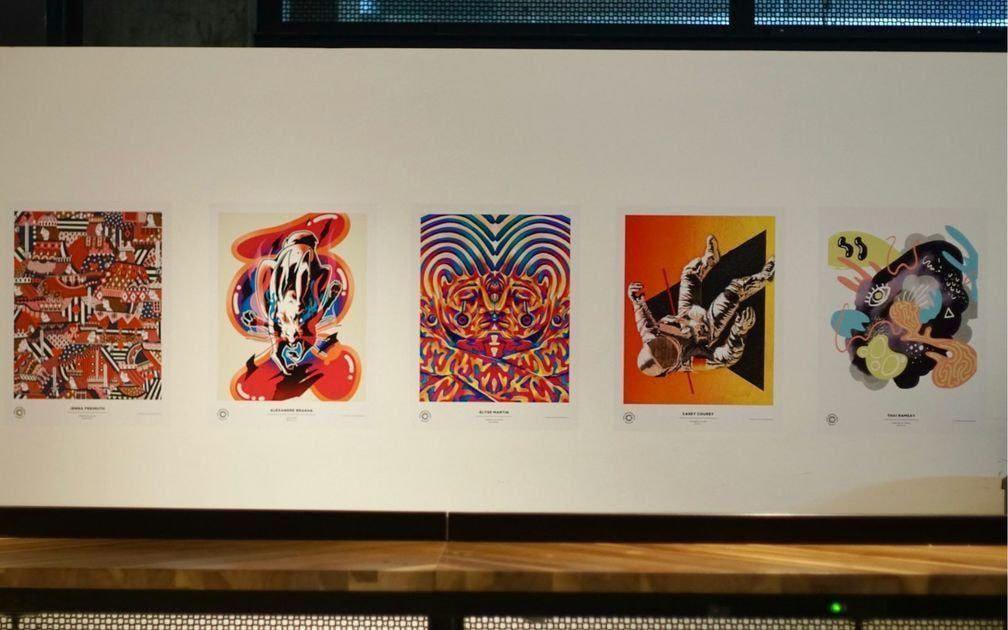
If you sell collections, visual consistency across your listing images is what makes your shop look like a brand rather than a random assortment of products. Consistent framing, consistent color treatment, consistent style of mockup templates. When your mockups are generated with real renders rather than AI prediction, you get consistent color output across every image because the source of truth is always your artwork file, not a model's interpretation of it.
This is particularly relevant when you are generating mockups in bulk. Mockupanda lets you apply a single design across dozens of templates in one session, and because the render engine works from your actual artwork pixels every time, every output is color-accurate and consistently sharp, regardless of how many variations you generate.
Returns, Reviews, and Trust
A less obvious but very real cost of poor mockup quality is the downstream effect on reviews and refunds. When a buyer receives a product that looks sharper and more detailed than the mockup suggested, that is a pleasant surprise and a potential five-star review. When a buyer receives a product that looks different from what the mockup showed, even if technically the product is correct, you have a trust problem.
AI-distorted mockups misrepresent your artwork in ways that are hard to predict. The buyer who purchased based on the mockup may feel the actual print does not match. That conversation is frustrating, time-consuming, and damaging to your shop's standing.
Takeaway: Mockup quality affects price perception, conversion rate, shop-wide brand consistency, and your review score. Every one of these is a lever on your revenue. Treating mockup quality as a secondary concern is treating your revenue as a secondary concern.
What to Look for in a Mockup Tool for Print-on-Demand
Not all mockup tools are equal, and the marketing language around them can obscure what they are actually doing under the hood. Here is what to evaluate.
Transparency About the Render Method
A tool that uses real pixel rendering will typically describe it in terms like perspective warp, corner pins, UV mapping, or smart object placement. A tool that uses AI generation will often describe it in terms of "AI-powered," "intelligent compositing," or similar phrases that sound impressive but mean the output is a prediction.
If a tool does not say clearly how it renders your artwork onto the template surface, that is worth investigating before you commit to it. Ask support, or test it with a design that has fine detail and strict color requirements and compare the output to your original file.
Bulk Generation Without Quality Loss
For print-on-demand sellers running high-volume shops, the ability to generate many mockups quickly is essential. But bulk generation is only valuable if the per-mockup quality holds up. With a real render engine, quality is determined by the transform, not by how many renders are happening simultaneously. With an AI pipeline, quality can vary between individual renders because the model output has inherent variability.
Mockupanda is built specifically around this problem. The bulk generation feature applies your design to dozens of templates at once, and because it uses pixel-accurate rendering, every output in that batch is as sharp and color-correct as if you had rendered each one individually.
File Format Support and Output Quality
Check what file formats a tool accepts for uploads and what it outputs. For print-on-demand sellers, transparent PNG upload support is critical if your designs have non-rectangular boundaries. You want alpha channel preservation through the entire render pipeline so that the transparency in your artwork is respected in the output.
On the output side, check the download quality settings. Compressed JPEG at low quality settings will degrade even a pixel-perfect render at the download stage.
Takeaway: When evaluating mockup tools, ask specifically how artwork is composited onto the template surface. Look for real render terminology, test with detailed artwork, and confirm the tool's bulk output is consistent, not just the individual renders.
How This Applies to API-Driven Mockup Workflows
If you are a developer building a print-on-demand platform, or a seller who has scaled to the point of automating your listing image production, the pixel-perfect question becomes even more critical because errors at scale are expensive.
Render Quality in Automated Pipelines
When you are generating hundreds or thousands of mockups programmatically via an API, you cannot manually review each output for quality. You are trusting the render engine to get it right every time. An AI-based pipeline introduces quality variance that you cannot catch at scale. A real render engine produces deterministic output: the same artwork on the same template always produces the same result.
This determinism is essential for automated workflows. If you are generating mockups for a catalog synchronization, a product launch automation, or a bulk listing update, you need to know that the output quality is predictable. Variance in AI-generated outputs means you either accept unpredictable quality or build in a manual review step that defeats the purpose of automation.
The Mockupanda API Approach
The Mockupanda REST API uses the same render engine as the web app, which means the pixel-perfect quality guarantee applies to every programmatic render. You send your artwork URL and your template IDs, and the API returns rendered mockup images that are as sharp and color-accurate as anything produced in the browser editor.
For batch operations, you can include up to 12 templates in a single request. For multi-frame templates like diptychs or triptychs, you supply multiple artwork URLs via the artwork_urls parameter. The API supports filtering templates by aspect ratio and artwork matching, so you can programmatically select only the templates that are appropriate for a given design's proportions.
And because the render is deterministic, you can build a workflow around it with confidence. The same API call with the same inputs will always produce the same output, which means your automated pipeline is predictable, testable, and debuggable in a way that an AI-based pipeline is not.
Takeaway: For API-driven workflows, render determinism is as important as render quality. A real render engine gives you both. Build your automation on a foundation that produces predictable output and you remove a whole category of quality-control problems from your pipeline.
Putting It All Together: Choosing Quality as a Business Strategy
The choice between AI-generated mockups and real renders is not just a technical preference. It is a business decision with measurable consequences.
AI mockup tools are appealing because they promise speed and novelty, but the speed comes at the cost of accuracy. When your design includes fine detail, precise color, or exact proportions, that accuracy cost is paid by your conversion rate, your brand consistency, and eventually your shop's reputation.
Real render engines are not slower. Tools like Mockupanda generate mockups in real time in the browser. The render quality does not come from a tradeoff with speed. It comes from doing the compositing correctly in the first place.
For print-on-demand sellers, the standard to hold your tools to is simple: does this mockup accurately represent what my customer will receive? If the answer is yes, your mockup is doing its job. If the answer involves phrases like "mostly" or "close enough," that gap is costing you sales.
Pixel-perfect is not a marketing phrase. It is a description of what happens when a render engine treats your artwork as the source of truth rather than as a prompt for a prediction. Every serious print-on-demand seller deserves that standard, and the tools that can deliver it are available and affordable. Hold your tools to the right bar.
Takeaway: Make mockup quality a deliberate business decision, not an afterthought. The sellers who invest in accurate, pixel-perfect product presentation are the ones who can charge more, convert better, and build shops that buyers trust and return to.
Keep reading

Gallery Wall Mockup Generator: How to Showcase a Multi-Print Collection in a Single Scene Without Hiring a Photographer

SmartMockups Alternative: Why Print-on-Demand Sellers Are Switching to Bulk Mockup Generators That Apply One Design Across Dozens of Templates